Clock Config Tab
Use the Clock Config tab to set the PTPv2 clocking configuration for devices that support RTP (AES67 and ST 2110-30).
See also: AES67 and SMPTE ST 2110-30 Audio
AES67 and ST 2110-30 require PTPv2 (Precision Time Protocol, version 2) for accurate clock synchronization. Enabling PTPv2 for your devices allows them to send and receive RTP flows.
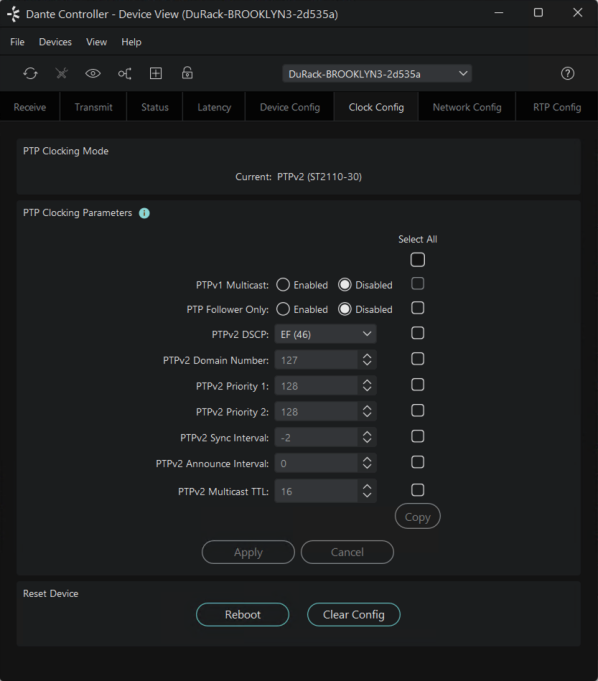
To enable PTPv2 for your devices:
-
Open the Device View for the device.
-
Select the Clock Config tab.
-
For supported devices with AES67 enabled, the clock mode can be set to ‘AES67 Auto’ or ‘AES67 Manual’. Auto mode can be used in most circumstances, and some settings are automatically set (and cannot be changed).
Note: ST 2110-30 and AES67 with manual clock mode allow explicit PTP priority configuration, whereas AES67 Auto mode allows backwards compatibility with older devices, and defers to the device to decide its own clock hierarchy priority (with Preferred Leader made available if required).
-
- PTPv1 Multicast is disabled by default for ST 2110-30 and AES67 with Manual clock mode. Note that this may disrupt clocking if there are PTPv1-only devices on the network and no devices using both PTPv1 and PTPv2 to bridge the protocols.
-
- Enable 'PTP Follower Only' if you want to ensure that this device never becomes the PTP Grand Leader. This is useful if you have a dedicated clock device or want to avoid certain devices taking over as the network clock source.
- Disable 'PTP Follower Only' if you want the device to be eligible to become the Grand Leader, according to the PTP election process.
-
PTPv2 DSCP (Differentiated Services Code Point)
- The DSCP is a field in the IP packet header used to classify and prioritise network traffic (Quality of Service, or QoS). Setting a specific DSCP value for PTPv2 traffic allows network switches and routers to recognise and prioritise these packets, ensuring accurate and reliable clocking across your network.
- Assigning a high-priority DSCP value to PTPv2 (such as EF or CS7) ensures these packets are delivered reliably, even on busy networks.
- EF is the default value for PTPv2 event packets on all Dante devices. This value is specified by the AES67 standard.
- PTP packets with a DSCP value of CS7 have higher priority those set to EF. This value is recommended for Dante flows.
-
PTPv2 Domain Number (and subsequent settings)
- The PTPv2 Domain Number identifies the “domain” or logical group of devices that should synchronize their clocks together. Devices with the same PTPv2 Domain Number will participate in the same clocking group and synchronise with each other. Devices with different domain numbers will ignore each other’s PTP messages and form separate clock groups. For most users, the default settings will work. Advanced users can adjust priorities, sync intervals, and other options. For AES67, the domain number is fixed at 0.
- Changing PTP Priorities and message intervals can break network clocks, causing loss of audio. It is therefore recommended that only users with a good understanding of PTP parameters should change priorities and message intervals.
- Note: In managed (DDM or Director) networks, the PTPv2 clock domain configured for the domain or site must match that of the flow. If they do not match, when you attempt to subscribe to the flow, Dante Controller will report 'Clock domain mismatch'.
-
Apply Settings
- Click Apply to save changes.
In ST 2110-30 mode, you can copy your clocking settings to another device:
-
Select the required parameters and click Copy.
-
A list of compatible devices is displayed.
-
Select the devices you want to copy the settings to and click Ok.