Multicast Transmit Flow Configuration
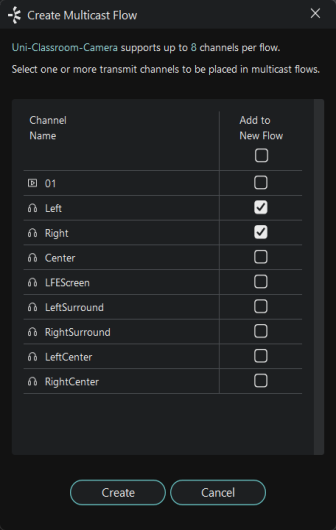
Click the 'Create a new multicast flow' button in Device View to open the Create Multicast Flow dialog.

The dialog displays a list of the Tx channels for the device.
To add channels to a multicast flow, select the checkboxes for the channel name. Once you have selected all the channels required, create the multicast flow by clicking the Create button at the bottom of the dialog box. To abandon creating a new multicast flow, click Cancel.
Once a flow has been created, it will appear in the list of flows in the transmit pane, along with the channels contained within that flow. Channels cannot be added to or removed from existing flows. Each time the dialog is used to select additional channels, a new multicast flow will be created.
By default, Dante receivers will connect to a multicast flow if one exists that contains the required channel(s), rather than creating a new unicast flow.
If a channel that does not form part of an existing multicast flow is added to a new multicast flow, any existing unicast subscriptions to that channel will automatically switch over to use the new multicast flow.
A good rule of thumb is to use multicast when there are more than two receivers for a specific media channel. You should also assume that the flow will flood throughout the entire network, and therefore consume bandwidth on all network links.
Note: Some ancillary channel types for video (Dante AV) devices cannot be added to multicast flows.
Maximum Channels per Flow (Audio Devices Only)
The number of channels that can be added to a Dante multicast flow varies by device type. This is displayed at the top of this window, and is 64 channels for the device shown above.
If you select more channels than the maximum supported channels per flow, multiple flows will be created. For supporting devices, you can restrict flows to fewer channels if required, using the drop-down menu in the Flow Config section.
This control also affects the number of audio samples per packet:
| Maximum Channels Setting | Samples per Packet |
|---|---|
| 16 | 16 |
| 32 | 8 |
| 64 | 4 |
Smaller packet sizes may enable lower device latency settings for relevant subscriptions – use the Latency tab in Device View to monitor latency performance.
Note: Dante devices on legacy (pre v4.2 firmware) will reject a 'create multicast flow' operation with more than 8 channels.
Note: Video flows support only 1 video channel.
Managing Flow Size
Multicast flows propagate through the network to every device that requests one or more of the channels in the flow. When considering network traffic management, in a typical network where no devices actually need all channels, it would be more advisable to create multiple flows than it would to create one flow containing all channels.
In the first example illustrated below, one multicast flow was created, containing four channels. None of the devices actually require all four channels, but both switches are processing four channels of traffic.
In the second example, two flows were created with two channels each. All devices are receiving the channels they need, but the switches are processing half the traffic.

Figure 1 - Single multicast flow with all channels

Figure 2 - Two multicast flows, with half the number of channels in each
Deleting Multicast Flows
Care should be taken when deleting a multicast flow, as the existing subscriptions will convert back to unicast. This has the potential to result in exceeding the link capacity or maximum number of flows at the transmit device, as multiple unicast flows will be established between the transmitter and its receivers. It may be advisable to remove some or all of the media routes prior to deleting the multicast flow.
Note: Certain Ethernet switches support IGMP (Internet Group Management Protocol), a protocol that provides the ability to 'prune' multicast traffic, so that it travels only to those end destinations that require that traffic. If this is the case, and IGMP is correctly configured on all the Ethernet switches, then multicast media will not flood throughout the network, but will instead be sent only over the links required to deliver it to subscribed devices.
AES67 and SMPTE ST 2110-30 (RTP) Flows
See:
AES67 and SMPTE ST 2110-30 Audio
Creating AES67 or ST 2110-30 (RTP) Transmit Flows