RTP Config Tab
Use the RTP Config tab to set the RTP mode (AES67 / ST 2110-30) for supporting devices.
See also: AES67 and SMPTE ST 2110-30 Audio
Check Device Compatibility
Not all Dante devices support AES67 or ST 2110-30. In Dante Controller, compatible devices will show an “RTP Config” tab in their device view.
To set the RTP mode:
-
Open the Device View for the device you want to configure.
-
Select the RTP Config tab.
-
Choose the RTP mode:
-
AES67: For interoperability with other AES67 devices.
- Supports up to 8 audio channels at 48 kHz or 96 kHz sample rates
-
ST 2110-30: For broadcast environments requiring compliance. Six profiles are supported:
- ST 2110-30 A: Up to 8 audio channels at 48 kHz with 1ms packet times
- ST 2110-30 AX: Up to 8 audio channels at 96 kHz with 1ms packet times
- ST 2110-30 B: Up to 8 audio channels at 48 kHz with 125 µs packet times
- ST 2110-30 BX: Up to 8 audio channels at 96 kHz with 125 µs packet times
- ST 2110-30 C: Up to 64 audio channels at 48 kHz with 125 µs packet times
- ST 2110-30 CX: Up to 64 audio channels at 96 kHz with 125 µs packet times
Note: Not all options are supported by all Dante devices - only supported options will be available based on the device capabilities.
AES67 Mode
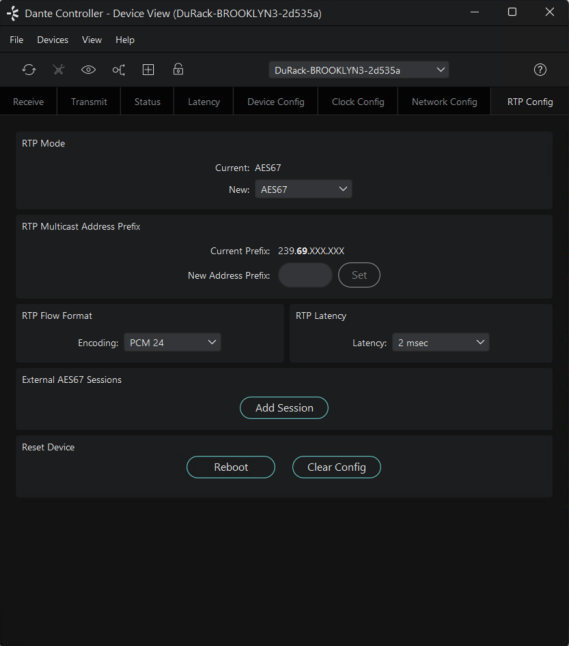
Devices in AES67 mode are able to transmit and receive AES67 multicast flows to / from non-Dante AES67-enabled devices. Between Dante devices, Dante's native audio transport protocol is used instead (even when AES67 is enabled for both devices).
In AES67 mode, the following settings are available:
RTP Multicast Address Prefix
You can use the RTP Multicast Address Prefix field to specify a multicast subnet, for cases where you need to transmit to or receive from a particular address range.
The multicast address prefix set at device level does not affect which AES67 flows from non-Dante devices are displayed in Dante Controller. However, when subscribing a Dante device to a non-Dante Tx flow, the multicast address prefix set for the receiver must match that of the Tx flow. If they do not match, the subscription will appear to succeed, but audio will not actually flow.
Dante devices are able to transmit RTP flows on any IP address. However, some devices will only subscribe to AES67 flows in the 239.x/16 address range:
-
Brooklyn II
-
Dante HC
-
Broadway
-
Older Brooklyn 3 (up to and including v4.2.x firmware)
-
Older Zynq IP Core (up to and including v4.2.x firmware)
If you need to subscribe any of these Dante device types to an RTP audio flow from a third-party device, ensure that the transmit flow is in the 239.x/16 address range.
RTP Flow Format
Defines the encoding (audio bitrate) for AES67 flows to or from this device.
RTP Latency
Defines the receive latency for RTP audio flows on the device.
External AES67 Sessions
Click this button to add an external session (see below).
ST 2110-30 Mode
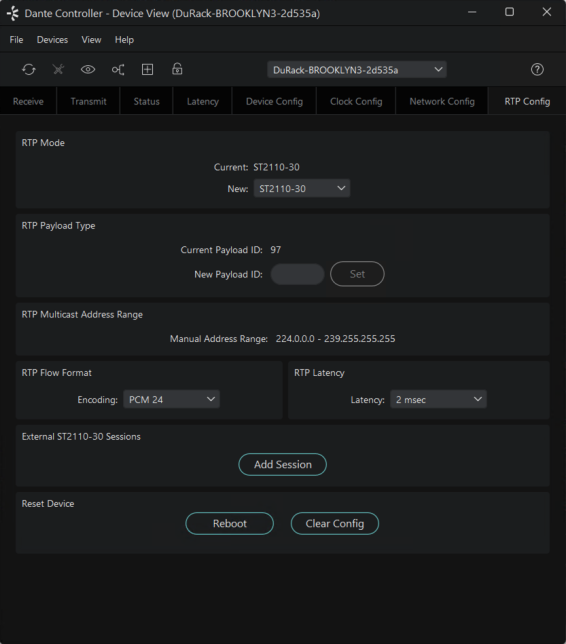
Devices in ST 2110-30 mode are able to transmit and receive ST 2110-30 multicast flows to / from non-Dante ST 2110-30-enabled devices. Between Dante devices, Dante's native audio transport protocol is used instead (even when ST 2110-30 is enabled for both devices).
In ST 2110-30 mode, the following settings are available:
RTP Payload Type
Payload ID specifies the properties of an RTP audio flow. Dante transmitters allow dynamic Payload ID ranges (as specified in RFC3551). Users can set a value from 96 to 127 on the Dante transmitter.
RTP Multicast Address Range
The multicast address range determines which IP addresses are used for audio flows. For ST 2110-30, addresses are assigned by default but can be customised. Always ensure the address range is compatible with all devices involved.
RTP Flow Format
Defines the encoding (audio bitrate) for RTP audio flows to or from this device.
RTP Latency
Defines the receive latency for RTP audio flows on the device.
External ST 2110-30 Sessions
Click this button to add an external session (see below).