Privacy Preferences
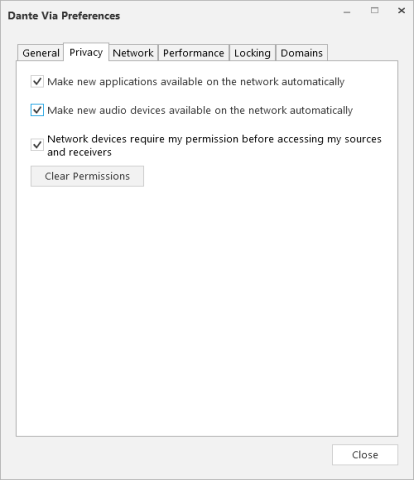
Make new applications available on the network automatically
When selected, software applications that are started in future will be automatically Dante-enabled (exposed to the network). Permission will still be required for new connections (based on the above settings).
When not selected, software applications that are started in the future will not be Dante-enabled by default.
Make new audio devices available on the network automatically
When selected, audio devices that are started in future will be automatically Dante-enabled (exposed to the network). Permission will still be required for new connections (based on the above settings).
When not selected, audio devices that are started in the future will not be Dante-enabled by default.
Network devices require my permission ...
If selected, when any user first tries to connect to one of your sources, you will be presented with a pop-up dialogue asking you to allow or deny the connection (see Privacy and Permissions for more information).
If not selected, any user can connect to and receive audio from any of your Dante-enabled sources at any time, without your permission.
Important: Be very careful with this option. Audinate accepts no responsibility for privacy issues that result from the use of this option.
Clear Permissions
Revokes all previously granted permissions. When clicked, any new connections to any of your sources will require your permission, and any existing connections will require permission to be re-granted.