Creating AES67 or ST 2110-30 (RTP) Transmit Flows
Note: Ensure you have configured the RTP Config and Clock Config for RTP support.
- In Device View, either:
- Click the 'Create a new multicast flow' button:

- Or, select the Transmit tab, and in the Multicast Transmit Flows panel, click Add.
- Click the 'Create a new multicast flow' button:
- Select AES67 or ST 2110-30 (A, B or C when configured for 48kHz, AX, BX or CX for 96kHz) as the flow type (available options will depend on the RTP config for the device).
AES67 Flows
Setting Up AES67 Flows
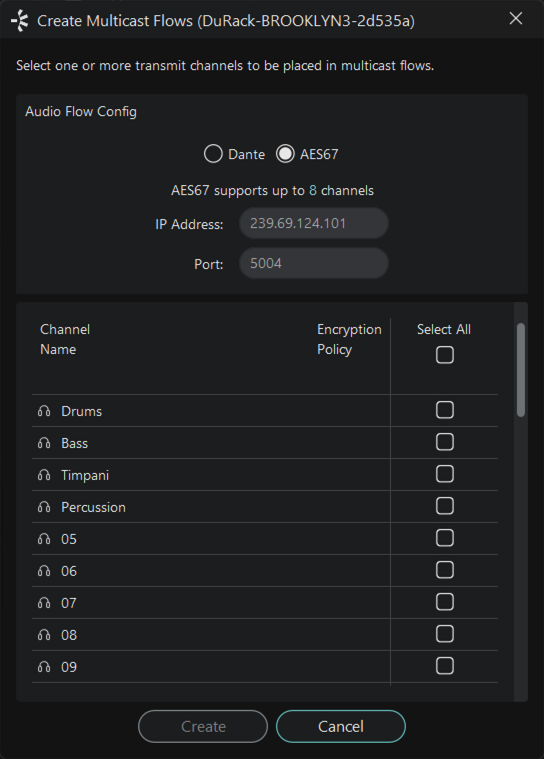
-
Set the IP Address for the flow, and the Port number.
Note: Dante devices are able to transmit RTP flows on any IP address. However, some devices will only subscribe to AES67 flows in the 239.x/16 address range:
- Brooklyn II
- Dante HC
- Broadway
- Older Brooklyn 3 (up to and including v4.2.x firmware)
-
Older Zynq IP Core (up to and including v4.2.x firmware)
If you need to subscribe any of these Dante device types to an AES67 flow from a third-party device, ensure that the transmit flow is in the 239.x/16 address range.
-
Select the channels you want to add to the transmit flow. If the number of selected channels exceeds the maximum number supported by the config, multiple flows will be created.
-
Click Create.
Only AES67-enabled devices can receive AES67 flows. Dante devices cannot subscribe to AES67 flows from other Dante devices.
For AES67-enabled Dante devices, each device transmit channel can simultaneously support an AES67 multicast flow and a standard Dante multicast flow. PTPv1 Multicast must be enabled in the PTP Clocking Parameters to support this.
Subscribing to AES67 Flows
RTP transmit flows (including AES67 flows) from non-Dante devices appear in blue at the far right of the Routing tab of the Network View, and at the bottom of the Available Channels list in the Device View > Receive tab. AES67 flows are identified by their transmit multicast IP addresses, rather than device names.
AES67 channels can be subscribed to (by supporting devices) in the same way as channels from other transmitters.
ST 2110-30 Flows
Setting Up ST 2110-30 Flows
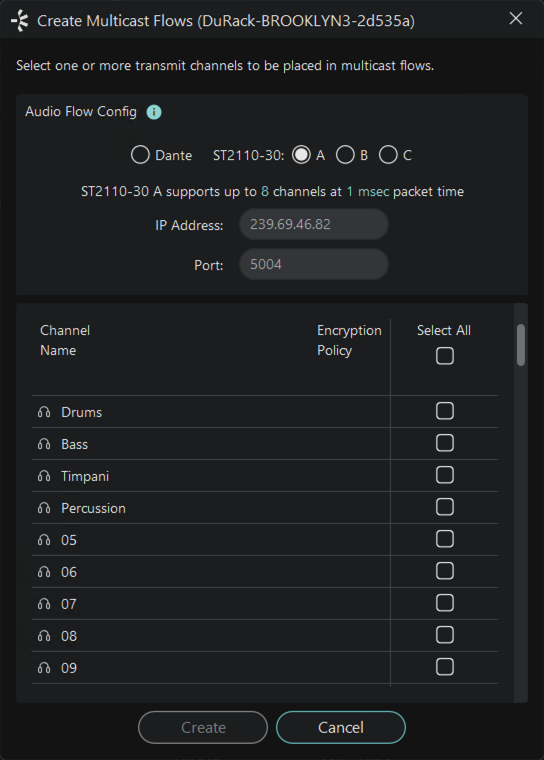
-
Set the profile (A, B or C when configured for 48kHz, AX, BX or CX for 96kHz).
-
Set the IP address and port number. For ST 2110-30 flows, the IP address must be in the range 239.0.0.0 to 239.254.254.254. The port can be set to any non-administrative port number.
-
Select the channels you want to add to the transmit flow. If the number of selected channels exceeds the maximum number supported by the config, multiple flows will be created.
-
Click Create.
ST 2110-30 flows created in Dante Controller are advertised on the network via SAP/SDP.
The transmit flow will present in the controller software for your ST 2110-30 receiver if it natively supports SAP/SDP parsing. If not, an alternative mechanism will be required to parse the SDP descriptor for the flow. The configuration of third-party ST 2110-30 receivers is specific to the receiver.
For ST 2110-30-enabled Dante devices, each device transmit channel can simultaneously support an ST 2110-30 multicast flow and a standard Dante multicast flow. PTPv1 Multicast must be enabled in the PTP Clocking Parameters to support this.
Subscribing to ST 2110-30 Flows
ST 2110-30 transmit flows from non-Dante devices appear in blue at the far right of the Routing tab of the Network View, and at the bottom of the Available Channels list in the Device View > Receive tab.
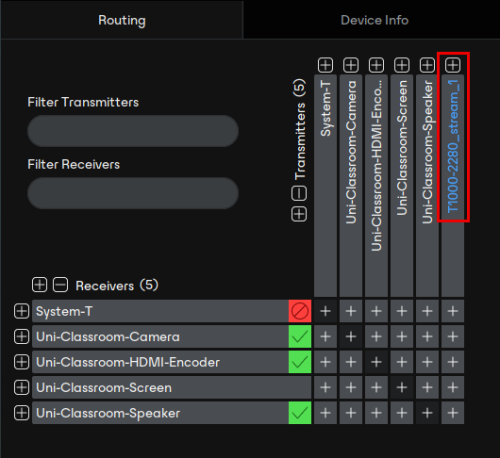
The device name is taken from the SDP descriptor for the flow as advertised by the device, or configured in Dante Domain Manager. If the transmitter does not advertise flows via SAP/SDP, you can use Dante Controller (or DDM) to generate a 'proxy' RTP session with a descriptor that is supported by Dante Controller.
ST 2110-30 channels can be subscribed to (by supporting devices) in the same way as channels from other transmitters.